logo
製品
引用
製品
製品
製品
家へ > 製品 > 上部フューザーロール > Upper Fuser Roller D00C54001 for Brother HL-L8260 HL-L8360 HL-L8610 HL-4150 MFC-L8900 MFC-9460 MFC-9030 Printer Upper Heat Roller
カタゴリー
連絡先
連絡先: Mr. Jessie
ファックス: 86-0757-86771039
今連絡してください
メール

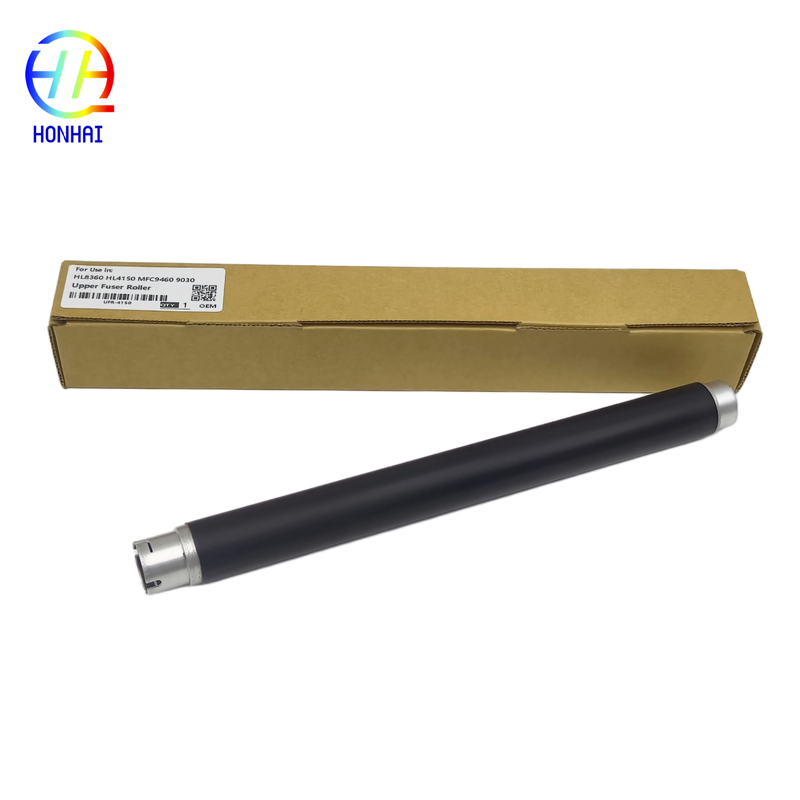
Upper Fuser Roller D00C54001 for Brother HL-L8260 HL-L8360 HL-L8610 HL-4150 MFC-L8900 MFC-9460 MFC-9030 Printer Upper Heat Roller

製品詳細

起源の場所: 中国

ブランド名: Brother

証明: CE, ISO9001

モデル番号: D00C54001

支払いと送料の条件

最小注文数量: 10

パッケージの詳細: ニュートラルパッキン

受渡し時間: 3~7営業日

支払条件: T/T、ウェスタンユニオン

供給の能力: 5000ピース/月

お問い合わせ
ハイライト:

Brother upper fuser roller D00C54001

,

Brother printer heat roller replacement

,

Brother HL-L8260 compatible fuser roller

特長製品名:
上部定着ローラー / 上部ヒートローラー / 定着加熱ローラー
品質:
トップ
配送:
Air/by Sea/by Express
色:
特長製品名:
上部定着ローラー / 上部ヒートローラー / 定着加熱ローラー
品質:
トップ
配送:
Air/by Sea/by Express
色:
Upper Fuser Roller D00C54001 for Brother HL-L8260 HL-L8360 HL-L8610 HL-4150 MFC-L8900 MFC-9460 MFC-9030 Printer Upper Heat Roller

An essential component of the fuser unit of your laser printer, the upper fuser roller (often called the heat roller) provides high (160°C - 200°C) uniform heat to melt the toner powder and adhere it to the paper permanently. Over time and many uses, the special rubber or silicone coating can wear, and you may see fading on your prints, out of focus text, toner offset (ghosting), and frequent paper jams. This Upper Fuser Roller (D00C54001) is built for use with a broad range of Brother HL and MFC series printers and is manufactured from quality materials to provide heat resistance and durability. Smooth, sharp, clean, and professional copies are yours once again, prolonging the life of your printer.

Product Parameters:
Type: Upper Fuser Roller
For Use in:

Toshiba E-Studio ES2303A ES2309A ES2809A 2006 2007 2306 2307 2506 2507

OEM Code: HR-2505-U 6LJ83405000
Photos:

 Upper Fuser Roller D00C54001 for Brother HL-L8260 HL-L8360 HL-L8610 HL-4150 MFC-L8900 MFC-9460 MFC-9030 Printer  Upper Heat Roller 0

 Upper Fuser Roller D00C54001 for Brother HL-L8260 HL-L8360 HL-L8610 HL-4150 MFC-L8900 MFC-9460 MFC-9030 Printer  Upper Heat Roller 1

 Upper Fuser Roller D00C54001 for Brother HL-L8260 HL-L8360 HL-L8610 HL-4150 MFC-L8900 MFC-9460 MFC-9030 Printer  Upper Heat Roller 2

Compatible Models:
  • Brother HL-L8260CDW, HL-L8360CDW, HL-L8250CDN, HL-L8350CDW
  • Brother HL-L9310CDW, HL-L9200CDW, HL-4150CDN
  • Brother DCP-L8410CDW
  • Brother MFC-L8610CDW, MFC-L8690CDW, MFC-L8895CDW
  • Brother MFC-L8900CDW, MFC-L8905CDW, MFC-L9550CDW, MFC-L9570CDW
  • Brother MFC-9460CDN, MFC-9340CDW, MFC-9330CDW, MFC-9130CW
Important Usage & Installation Instructions
Pre-Installation Preparation
  • Power Off & Cool Down: Before starting any repair, turn off the printer and unplug the power cord. The fuser unit operates at extremely high temperatures. Wait at least 30 to 60 minutes for the printer and the fuser assembly to cool down completely to avoid severe burns.
  • Prepare Your Tools: You will typically need a Phillips-head screwdriver. It is highly recommended to wear clean cotton or anti-static gloves to prevent fingerprints, oils, or dirt from contaminating the surface of the new roller, which could cause print defects.
  • Workspace Setup: Ensure you have a clean, flat, and well-lit workspace to lay out screws and components as you disassemble the printer.
Installation Steps
  1. Access the Fuser Unit: Open the rear cover or the designated fuser access panel on the back of your Brother printer.
  2. Remove the Fuser Assembly: Locate the fuser unit. Carefully unscrew the retaining screws on both sides of the unit and gently pull the entire fuser assembly out of the printer.
  3. Disassemble the Fuser: Place the fuser unit on your workspace. Remove the outer casings, gears, and any connecting wires or harnesses. Take photos during disassembly to help with reassembly later.
  4. Replace the Roller: Locate the old upper fuser roller. Remove the pressure springs and bearings holding it in place. Carefully extract the old roller and insert the new D00C54001 roller, ensuring it is seated correctly and rotates freely.
  5. Reassemble the Unit: Reverse the disassembly steps to put the fuser unit back together. Ensure all gears mesh properly and all screws are tightened securely.
  6. Reinstall into Printer: Slide the reassembled fuser unit back into the printer and secure it with the retaining screws. Close the rear cover.
Post-Installation Testing
  1. Power On: Plug the printer back in and turn it on. The printer may take a moment to heat the new fuser roller to the operating temperature.
  2. Run a Self-Test: Print a printer self-test page or a configuration page directly from the printer's menu. This helps verify print quality without relying on computer drivers.
  3. Check Print Quality: Examine the test page for sharp text, solid blacks, and smooth graphics. Ensure there are no repeating marks, smudges, or wrinkles.
Maintenance & Safety Tips
  • Handle with Care: The surface of the fuser roller is delicate. Avoid scratching it with sharp tools or fingernails during installation.
  • Check the Lower Roller: While replacing the upper roller, it is a good practice to inspect the lower pressure roller. If it is worn or damaged, replacing both simultaneously will yield the best print results.
  • Professional Installation: Replacing a fuser roller involves detailed disassembly of the printer's heating unit. If you are not comfortable with hardware repairs, we strongly recommend having a qualified printer technician perform the replacement to avoid accidental damage.
同様の製品